Simple Excel-like timesheet software case study
How a Services Team Replaced Complex Timesheet Software with an Excel-Like Workflow
A growing services team gave employees one familiar editable grid per client, continuous saving, month tabs and a clear approval flow while authorised admins retained correction control.
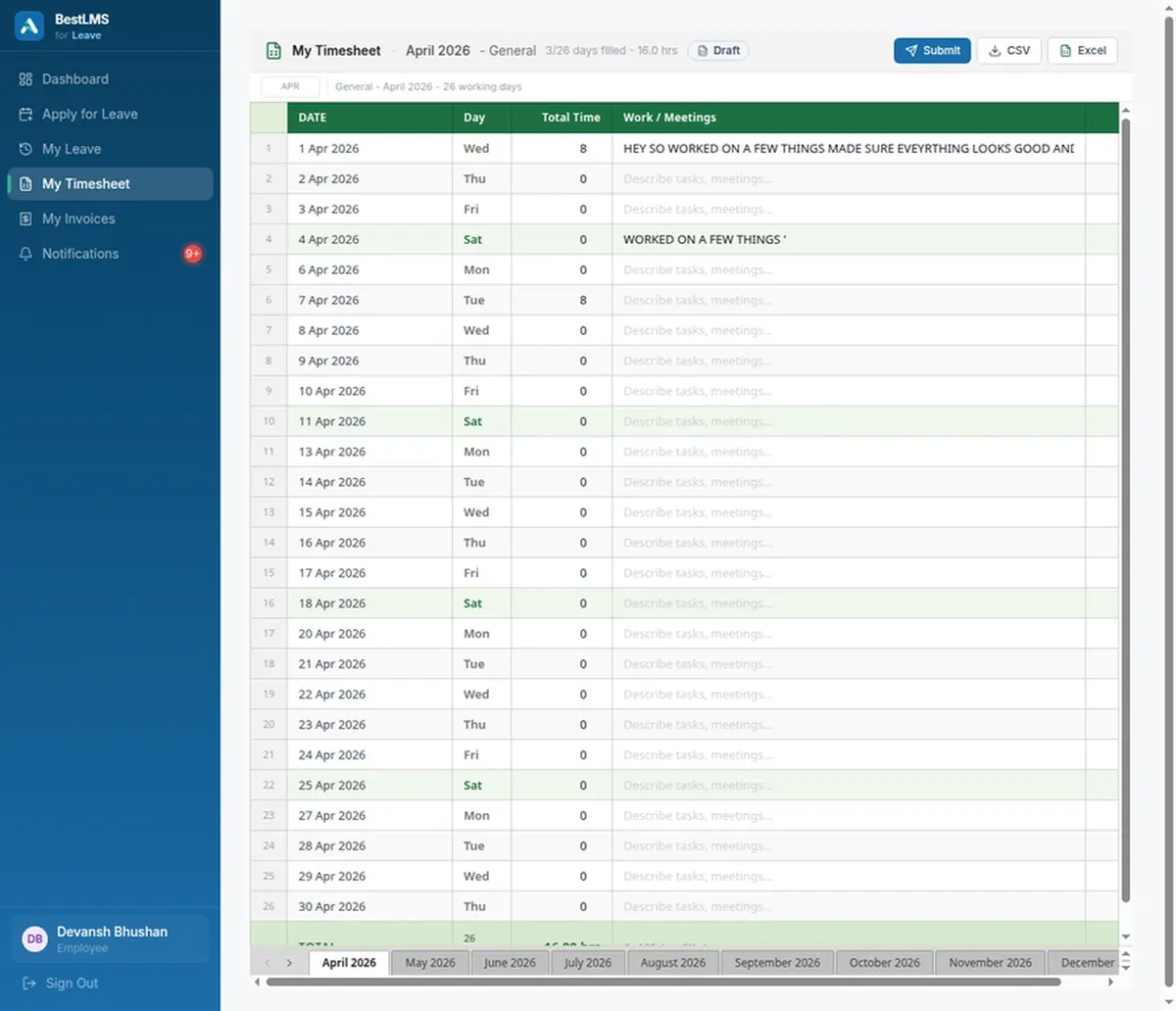
What changed, concretely
- A familiar editable grid per client, with month tabs
- Continuous saving, so a closed tab does not lose the week
- No training needed, because the interaction is already known
- A real approval step before anything is billed
- Admin-only correction, so approved records stay trustworthy
- One wrong cell is a fix, not a full month resubmission
Why do teams abandon complex timesheet software?
Timesheet tools are usually abandoned for adoption reasons rather than feature reasons. If entering a week of hours requires learning an unfamiliar interface, people postpone it, and postponed timesheets get filled in from memory at month-end, which is exactly when accuracy matters most. The team here had already been using spreadsheets successfully for the mechanical part of the job, because a grid with rows, columns and tab-to-move-on is an interface nobody needs training for. What spreadsheets could not provide was the structure around the grid: a reliable approval step, a record of who changed what, and a link from approved hours to what gets billed. Replacing the grid was the mistake in the previous tool. The grid was the part that worked.
How does an Excel-like grid keep both ease and control?
Employees get one familiar editable grid per client, with month tabs and continuous saving, so entering time uses the muscle memory people already have and nothing is lost to a forgotten save. Around that grid sits the structure a spreadsheet cannot enforce: a clear approval flow before anything is billed, and authorised admin correction control so a genuine mistake can be fixed without asking someone to resubmit an entire month. Those two things are what separate this from the shared folder of Excel files it replaced. The familiarity is deliberate rather than a compromise, because the failure mode of timesheet software is people not using it, and an interface that needs no explanation is the most reliable defence against that. Control is added around the grid instead of by replacing it.
Who should be able to edit a submitted timesheet?
Correction rights are the question every timesheet system has to answer, and answering it badly in either direction causes problems. If nobody can amend a submitted timesheet, a single wrong cell means resubmitting a month and re-approving it, so people work around the system. If anyone can amend anything, the approval means nothing because the approved figure can change afterwards without trace. Restricting correction to authorised admins keeps both properties: an error is a small fix rather than a restart, and the approved record stays trustworthy because the set of people who can alter it is known and deliberate. That is the reason admin editing exists as a specific capability here rather than as a general permission granted to everyone who can see the grid.
Why the previous tool was abandoned
It was not missing features. It was that entering a week of hours required learning an interface, and learning an interface is a cost people postpone. Postponed timesheets get completed at month-end from memory, which is the moment accuracy matters most and is least available. The team had already solved the mechanical part with spreadsheets: a grid, rows, columns, tab to move along, numbers where you expect them. What spreadsheets could not give them was the structure around the grid, the approval step and the record of who changed what. The previous tool replaced the grid to add the structure, and lost adoption doing it. The grid was the part that already worked.
What using it actually feels like
Somebody opens their timesheet for a client and sees a grid with the month laid out. They type hours where the hours go. There is no save button to forget, because entries persist as they are made, and no submit ritual to postpone until the end. Switching client means switching tab, which is the same gesture as switching sheet in a workbook. At the point of submission a manager reviews and approves, and that is the one genuinely new step compared with the shared folder it replaced. Everything else is deliberately the same as what people were doing already, because the most reliable defence against timesheet software going unused is an interface that requires no explanation.
The correction problem, and why admin-only is the answer
Every timesheet system has to decide who may change a submitted entry, and both simple answers fail. Lock it completely and one wrong cell means resubmitting and re-approving a whole month, so people route around the system or stop caring about accuracy at entry. Open it to everyone and approval stops meaning anything, because the approved figure can change afterwards with no trace. Restricting correction to authorised admins keeps both properties at once: a mistake is a small fix, and the approved record remains trustworthy because the set of people who can alter it is deliberate and known. That is why this exists as a specific capability rather than as a permission handed to anyone who can see the grid.
Frequently asked questions
Is the timesheet grid actually editable like a spreadsheet?
Yes. It is a grid per client with month tabs and continuous saving, designed so people can enter hours using the same habits they already have from spreadsheets, without training.
Can an admin fix a timesheet error after approval?
Authorised admins can make corrections, which avoids resubmitting and re-approving a whole month over one wrong cell. Correction rights are limited to admins specifically so the approved record stays trustworthy.
Does continuous saving mean work can be lost?
Entries save as people work rather than depending on a save action at the end, which removes the most common way time entry is lost: closing a page before submitting.
How does this handle multiple clients per person?
Each person gets a separate timesheet per client rather than one combined sheet split up later, so hours are attributed to the right client at the moment they are entered.
Do employees need training to use the timesheet?
No, and that is the design intent. It is a grid per client with month tabs and continuous saving, so the interaction is the one people already know from spreadsheets. The only genuinely new step is manager approval before billing.
What happens if someone closes the tab mid-entry?
Entries save as they are made rather than on a submit action, so closing a tab does not lose the week. This removes the most common way time entry was lost previously.