Client timesheet software
Client Timesheet Software for Employees and Contractors
BestLMS gives every employee and contractor a separate, spreadsheet-style timesheet for each client. Hours save continuously as people work, managers review and approve before anything is billed, and approved time flows straight into contractor invoices — so the numbers you bill and pay are the numbers that were actually signed off. It replaces a folder of Excel files, PDFs and screenshots with one structured month-end workflow that finance, managers and contractors all share.
What client timesheet software covers
- Separate timesheets for multiple clients
- Spreadsheet-style daily time entry
- Continuous saving and submission controls
- Manager review and approval workflows
- Contractor invoice and file collection
- Month-on-month administrative reporting
A familiar, spreadsheet-style grid people already understand
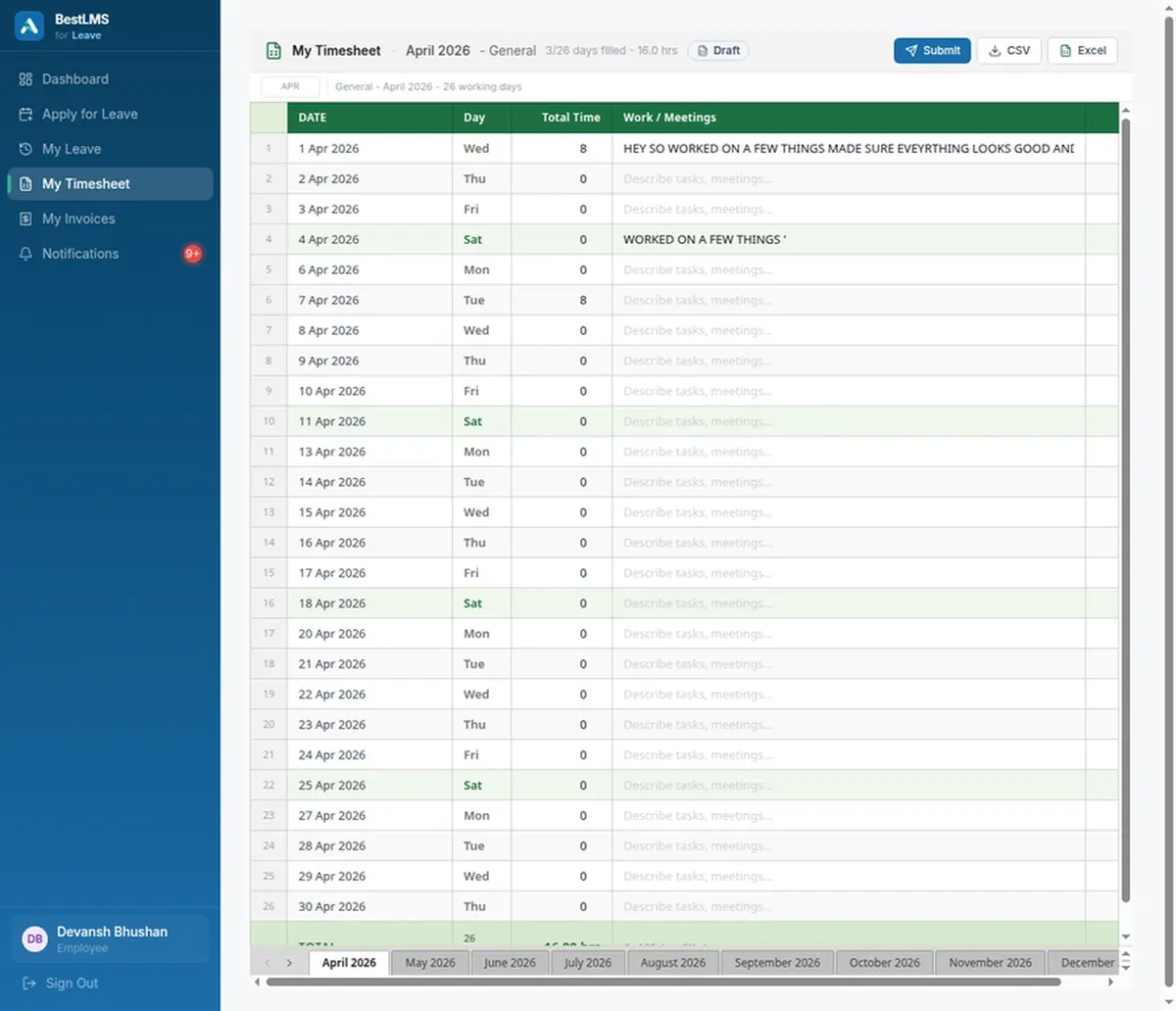
Employees and contractors enter time in an Excel-like grid — dates down one axis, work notes alongside the hours — so there is nothing new to learn and no multi-screen form to fight through. Entries save continuously as people move between cells, which means a lost connection or a closed tab never wipes out a week of work. Because the interface behaves like the spreadsheet the team was already using, most people are logging accurate time within minutes rather than after a training session.
A separate timesheet for every client
Each employee or contractor keeps one timesheet per client, with month tabs to move between billing periods. Hours are never mixed between accounts, so a person splitting the week across three clients produces three clean, separately billable records instead of one ambiguous total. For agencies and services teams juggling many clients at once, this keeps client reporting and internal billing tidy without anyone maintaining a spreadsheet per account by hand.
Manager approval before anything is billed
Submitted timesheets move through a clear review and approval workflow. Managers see the week in context, approve accurate hours in one action, or send an entry back with a note when something needs fixing. Authorised admins keep correction control for genuine errors — adjusting hours or notes without asking the employee to rebuild an entire submission — while everyone else works in a clean, guided view. Nothing reaches finance until a human has signed it off.
Approved hours become clean contractor invoices
Once a timesheet is approved, those hours connect directly to contractor invoice submission: the contractor raises an invoice against signed-off work and uploads it with the supporting timesheet in one place. Month-end billing is based on approved reality instead of reconstructed estimates, which shortens billing cycles and removes the most common source of client and vendor disputes — a mismatch between what was billed and what was actually agreed.
One structured view for finance at month end
Finance sees month-on-month submissions across every person and client in one place, rather than chasing Excel files, PDFs and screenshots across inboxes. It is immediately clear who has submitted, whose hours are approved, and which invoices are still outstanding, so the monthly close stops being a scramble and becomes a short, predictable process.
Frequently asked questions
How does client-wise timesheet tracking work?
Each employee or contractor keeps a separate timesheet per client, entered in a familiar spreadsheet-style grid with month tabs. Entries save continuously as people work, so hours are never lost or mixed up between accounts, and every client ends the month with its own clean, billable record.
Can employees and contractors both use it?
Yes. Full-time employees and external contractors use the same spreadsheet-style timesheet and the same approval flow. Contractors additionally submit invoices against their approved hours, so one workflow covers both your internal team and your vendors.
Can managers approve timesheets before billing?
Yes. Submitted timesheets flow through manager review and approval, and nothing reaches finance until it is signed off. Managers can approve accurate hours in one action or return an entry with a note, and approved hours connect directly to contractor invoice submission.
What happens if a submitted timesheet has an error?
Authorised admins can correct hours or work notes after submission without asking the employee to rebuild the whole timesheet. The change is applied in place, so a single wrong cell does not force a full resubmission or hold up the rest of the month’s billing.
Does BestLMS handle multiple clients per person?
Yes. A person working across several clients keeps a separate timesheet for each, switching between them by client and month tab. Their hours stay cleanly split, which is what makes accurate per-client billing and reporting possible for agencies and services teams.
How is timesheet software priced in BestLMS?
Client and contractor timesheets are part of the Workforce plan at ₹199 per user per month, which also includes performance reviews and contractor invoices. Leave and attendance start on the Core plan at ₹99 per user per month, and you can upgrade when you need timesheets.